
GUIDE · TEACH A MOUSE
How to teach a child to use a computer mouse
Mouse skills for kindergarten and the early school years: which skills come first, how to teach them, and how to set up the computer.
A computer mouse has a handful of basic skills: moving the pointer, clicking, double-clicking, dragging and scrolling. This guide covers an order that is easy for young children, and tips for teaching at home. The order goes from easy to harder. It is what we recommend on this site, not something set by research.
The basic mouse skills
| Skill | What the hand does | Used for |
|---|---|---|
| Move | Slide the mouse to move the pointer | Pointing at things |
| Click | Press the button once | Pressing buttons, choosing things |
| Double-click | Press twice, quickly, in the same spot | Opening icons |
| Drag | Hold the button, move, then let go | Moving things |
| Scroll | Roll the wheel | Moving the page up and down |
An easy order to learn them
Move → Click → Double-click → Drag → Scroll
- Moving comes first. There is nothing to press, so children can simply watch the pointer follow their hand.
- Clicking is next. One press, and something happens right away, so it is easy to feel “I did that.”
- Double-clicking needs rhythm, and a hand that stays still. It goes more smoothly once clicking feels easy. → Double-click practice for kids
- Dragging means holding the button while moving, two things at once, so it comes later. → Drag and drop practice for kids
- Scrolling uses the wheel, a different feeling from pressing. The direction can feel opposite on a mouse and a trackpad, so it is easier once the setup is settled. → Trackpad or mouse first?
Every child is different. There is no need to stick to the order. Starting with whatever your child enjoys is fine.
Five tips for teaching
- Keep it short, and stop while it is fun. A few minutes is plenty at first. Ending on “I want to play more” makes them want to come back.
- Don’t take the mouse. When you want to show them, say “watch my hand” and show the movement with your own hand. Moving it themselves is what matters.
- Praise how, not just the result. Instead of “you did it,” try something specific, like “you moved it slowly, nice” or “you kept holding the button.”
- When it isn’t working, check the setup first. Look at the desk height, the size of the mouse and the pointer speed (see the next section).
- Start it as play, not practice. Some children dislike anything called practice. Picking it up naturally through play is easier to keep going.
Setting up: seat, mouse and pointer speed
Menu names can differ a little depending on your version.
- Seat: Feet on the floor or a footrest, and arms resting naturally on the desk. A chair that is too high or too low tires the hand.
- Mouse size: An adult mouse can be large for a small hand. A smaller mouse is worth trying.
- Pointer speed: If the pointer moves too fast, it is hard to aim. A slower speed makes targets easier to hit.
- Windows 11: Settings → Bluetooth & devices → Mouse, then “Mouse pointer speed.”
- Mac: System Settings → Mouse, then “Tracking speed.”
- Mouse or trackpad: A mouse can be easier at the start, because pressing, moving and letting go are separate. That is our view, not a rule. Whichever your child finds easier is fine.
Practice through play
In Hajimari Garden, each of the five skills is its own little game, set in a small meadow where friends grow the more you play.
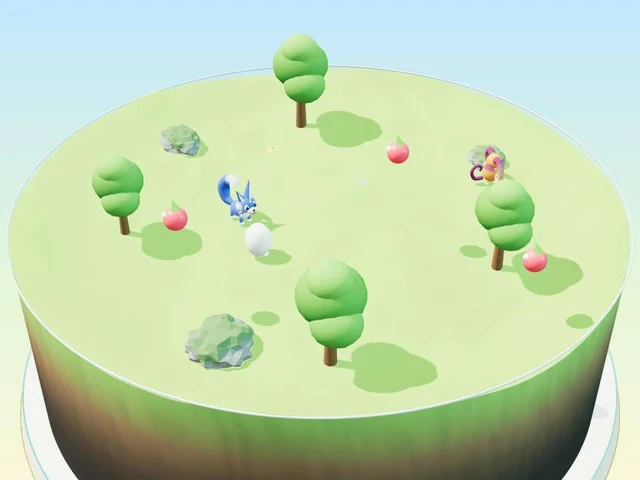
| Skill | Game | What happens |
|---|---|---|
| Move | Make flowers bloom | Just move the cursor onto the lights (no clicking) |
| Click | Feed your friends | Click once to drop food, and your friends grow |
| Double-click | Hatch the egg | Click the big egg twice, quickly |
| Drag | Put the babies to bed | Grab a friend and carry it to bed |
| Scroll | Zoom to discover | Zoom in for fairies, zoom out for a rainbow |
In every game, a hand on the screen shows what to do first. Mistakes never count as failing. If your child seems stuck for a while, a small “How to” hint appears on its own.
Free · No download · No sign-up · No ads on the game screen
When your child gets stuck
- Double-clicking is hard → Double-click practice for kids
- Things drop halfway while dragging → Drag and drop practice for kids
- Scrolling feels backwards, or the trackpad is tricky → Trackpad or mouse first?
- Tired overall → Take a break, and start again the next day with an easier game.
FAQ
What age can children start using a mouse?
There is no set age, and every child is different. Hajimari Garden is designed with ages 5–7 in mind, which covers kindergarten and the first years of school, but anyone who is new to computers can play.
How long should mouse practice be?
We do not suggest a fixed time. A few minutes is plenty at first, and ending while your child still wants more works well. Follow your child and your family’s own rules.
Does my child need to master every skill?
No. The order and the pace are different for every child. Enjoying clicking is a great start. The other skills can come little by little, when they are needed.