
GUIDE · DRAG AND DROP
Drag and drop practice for kids
Break it into three steps, and it gets much easier.
Dragging means “holding the button while moving,” which takes a little strength and attention in the finger. Dropping things halfway is very common. Breaking it into three steps, grab, carry and let go, makes it much easier to understand.
Why dragging is hard
Dragging means keeping three things going at the same time:
- Holding the button down (if the finger relaxes, the item drops).
- Moving the mouse while holding.
- Following the pointer and the target with the eyes.
If any one of them stops, the item drops halfway. Unlike a click, which is over in an instant, the hard part of dragging is keeping it going.
Teach it in three steps
Split the action into three words, and say them out loud as you do it together.
- Grab: Press the button on top of the item (“squeeze”).
- Carry: Keep holding, and move slowly (“gently”).
- Let go: Release the button where you want it (“pop”).
Saying “once you grab it, don’t let go” helps them remember to keep holding. Start with short distances, and carry things farther as they get used to it.
Tips for the finger
- Rest the hand lightly on the mouse. A tight grip makes it harder to press with the finger.
- Keep the pointer finger pressed down the whole time, and move the mouse with the rest of the hand.
- Leave space on the desk. If the mouse bumps the edge of the desk, the finger often lets go there.
On a trackpad
Menu names can differ a little depending on your version.
On a trackpad, dragging usually means pressing down and moving with another finger, which is even harder. A setting can make it easier.
Mac
- Open “System Settings” and choose “Accessibility.”
- Open “Pointer Control,” then “Trackpad Options.”
- Turn on “Use trackpad for dragging,” and choose “Three-Finger Drag” as the dragging style.
Now children can move things just by sliding three fingers. Even if a finger lifts for a moment, the item tends to stay selected, so carrying it far is easier.
Windows 11
In Settings → Bluetooth & devices → Touchpad, there are settings under “Taps.” There you may be able to turn on dragging by tapping twice and moving without lifting the finger. Names differ by version, so look near the “Taps” heading.
For many children, a mouse makes it easier to feel “keep holding” than a trackpad. Having one mouse at home makes practice easier.
Practice with a game
In Hajimari Garden’s drag game, children grab their friends in the meadow and carry them to bed.
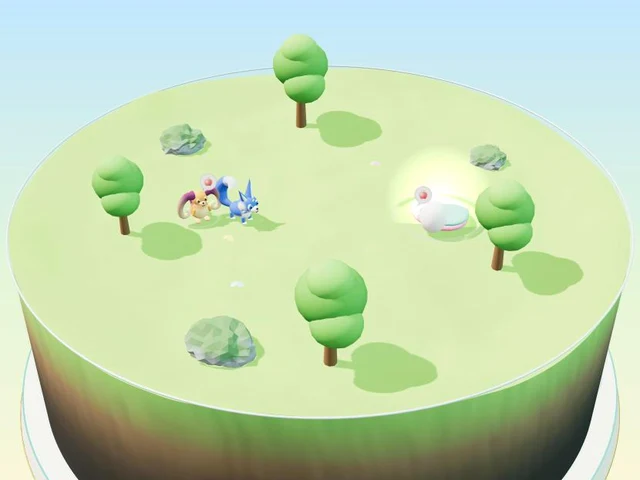
- White rings show up under the friend to carry and on the bed, so it is clear where to go.
- At first, a hand on the screen shows where to grab and which way to carry.
- Letting go outside the bed is fine. The friend just stays there. It never counts as failing.
- At higher levels, there are more friends to carry, and the bed is a little farther away (one, two, then three friends).
- There is also a river game where children carry lost fish back to the water (under “More games”).
Free · No download · No sign-up · No ads on the game screen
FAQ
My child keeps letting go halfway. What can we do?
Start by building success with short distances. If it is still hard, try the trackpad settings in this guide, or use a mouse. What matters most is not scolding, and going back to something they can succeed at.
Is dragging easier with a mouse or a trackpad?
Dragging needs the feeling of holding a button down, and that is generally easier to get with a mouse. Every child is different, though. Having one mouse at home makes practice easier.
What happens if my child makes a mistake in the game?
Nothing bad. If a friend is let go outside the bed, it simply stays where it is, and children can try again as many times as they like.